Level Editor Tool
verilogTown includes a level editor. This tool can be found in the "jars" directory and is called - "levelEditor.jar". When you run the program the first this you will see is the dialog box shown below.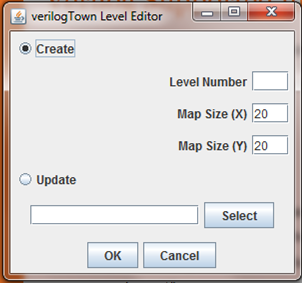
In this dialog you can create a new map or update an existing map. For your first map, pick a number such as "13" and enter it into Level Number (Note, if you pick 1 through 12, you will overwrite an existing level). Click OK.
The below screen will pop up which is the basic level editor:
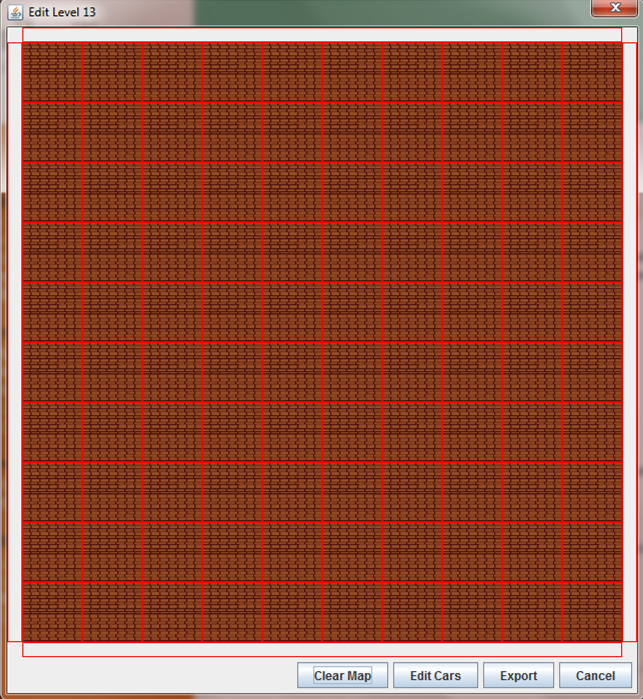
This is where you can
create the map. By left clicking and dragging, you can
quickly draw roads. By left clicking individual grid points
you can select the tile for that location, and by middle clicking you
can quickly scroll through all the tiles of that type of road (for
example, middle clicking on any tile above will turn it into the water
tile).
After building the map, you will need to add cars. To do this, click on "Edit Cars" button and you will see something like:
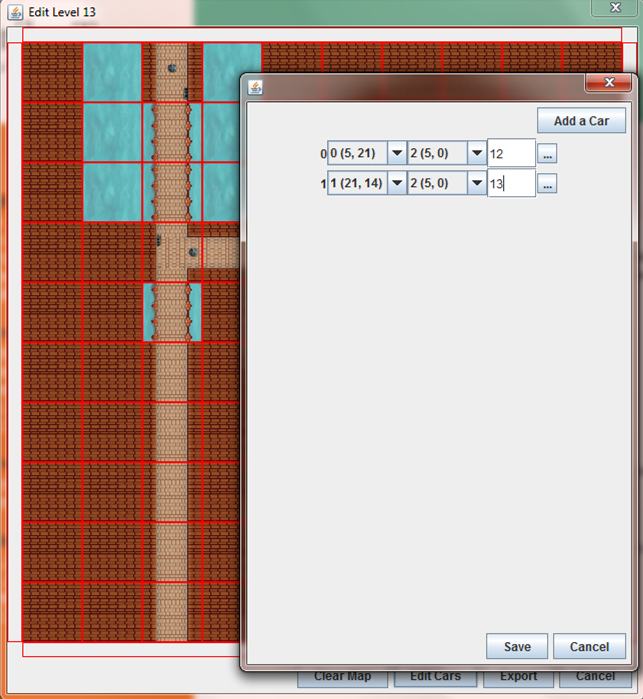
After building the map, you will need to add cars. To do this, click on "Edit Cars" button and you will see something like:
By clicking "Add a Car" you
add a new car. Then you can select the starting coordinates
and ending coordinates for that particular car. Finally, in
the blank box you can enter a number for at what time (in seconds) a
car will appear on the map. Save this, and finally, export to
create the xml and graphic files for the map.
These files will be stored in the "Levels" directory and a new folder called "Lv13" will be created. In that directory you will see a "map" directory that will contain "lv13.png" and "lv13.xml". This map will still not work in verilogTown. First, you will need to create a "VerilogFiles" directory in the "Lv13" and populate it with verilog files.
But the easiest way to do this is to create a map called 1 through 12 since all the files are already setup. In this case, you will just change the xml and graphics file. The only restriction is there needs to be a verilog file for each of the intersections on the map (3 our 4 way intersections). For example, level 12 has 11 intersections and in the "Lv12" -> "VerilogFiles" directory there are 11 "Traffic_signal_set_NUMBER.v" files. The NUMBER is 0 through 10. If you make a map with more than 11 intersections, you just need to copy and rename the file appropriately.
These files will be stored in the "Levels" directory and a new folder called "Lv13" will be created. In that directory you will see a "map" directory that will contain "lv13.png" and "lv13.xml". This map will still not work in verilogTown. First, you will need to create a "VerilogFiles" directory in the "Lv13" and populate it with verilog files.
But the easiest way to do this is to create a map called 1 through 12 since all the files are already setup. In this case, you will just change the xml and graphics file. The only restriction is there needs to be a verilog file for each of the intersections on the map (3 our 4 way intersections). For example, level 12 has 11 intersections and in the "Lv12" -> "VerilogFiles" directory there are 11 "Traffic_signal_set_NUMBER.v" files. The NUMBER is 0 through 10. If you make a map with more than 11 intersections, you just need to copy and rename the file appropriately.